
Ocean Schedules
A single carrier-neutral view of ocean service performance, combining schedules, vessel movements and reliability data to replace fragmented manual sources.
Ocean Schedules shows you how ocean services and vessels are actually performing across all major carriers. Search by port pair to see how a service has been doing — how reliably it arrives on time, how long voyages are typically taking, and how often sailings get cancelled.
The data comes from eeSea, a schedule intelligence company Xeneta acquired in 2025. Vessel-level activity, (such as where a vessel is and when it actually arrived),is tracked using EIS data and satellite information.
There are two main views: Services, where you can compare multiple services on the same lane, and Vessels, where you can look at individual vessel performance.
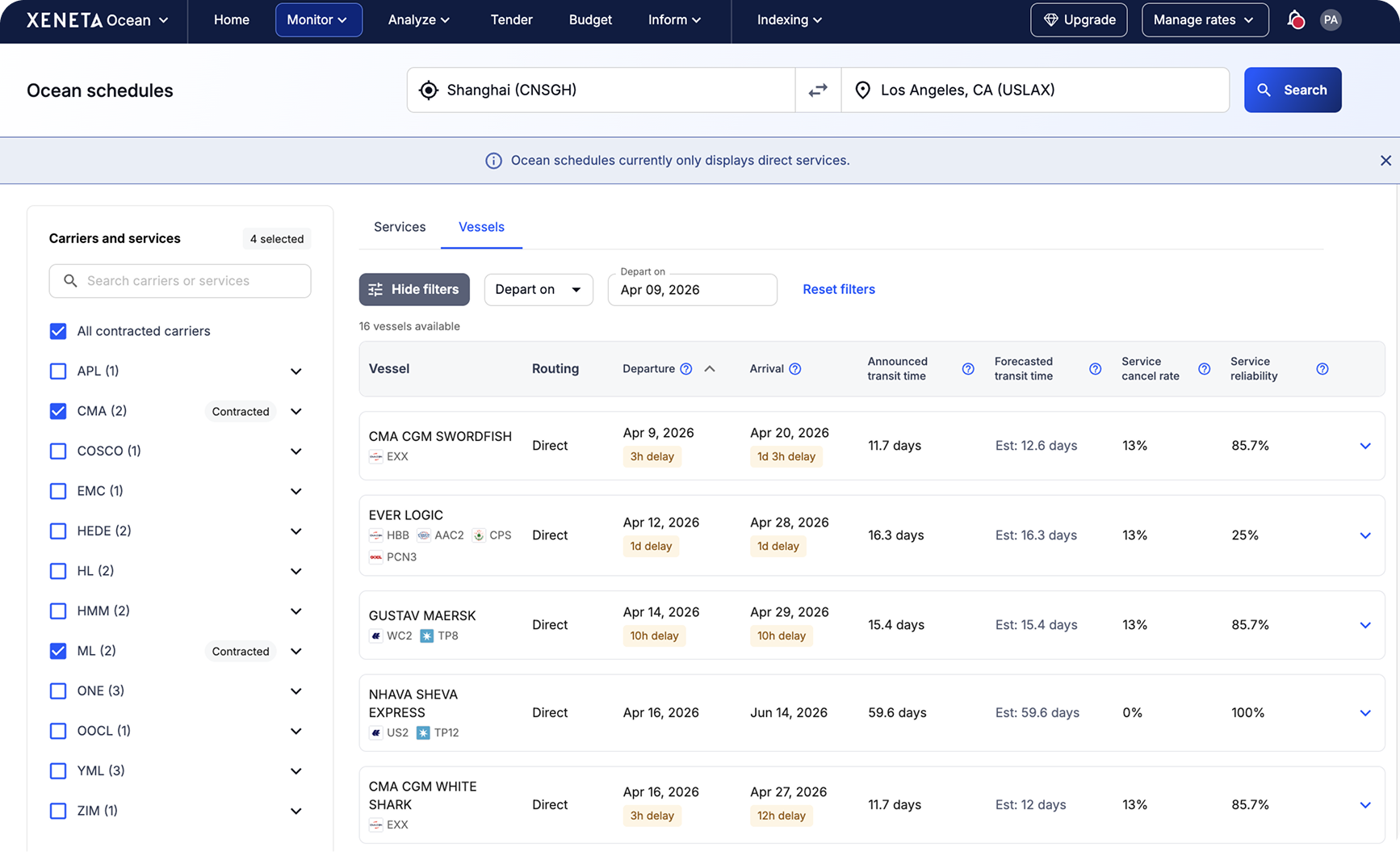
How each metric is calculated
Every metric in Ocean Schedules is based on either the carrier's published schedule or real vessel movement data. Here is what each number means and how we calculate it.
| Metric | Window / Source | What it measures | Key note |
|---|---|---|---|
| Announced transit time | Carrier-published schedule at service launch | The planned port-to-port travel time based on the schedule the carrier announced when the service was set up. Only updated when the carrier changes the entire service schedule. | Does not change with individual vessel delays or short-term carrier updates. |
| Actual transit time | 30-day rolling window | The average time vessels actually took to travel between two ports, based on real arrival and departure data over the last 30 days. | Updates continuously; reflects current real-world conditions. |
| Schedule reliability | 4-week rolling window, up to last Sunday | The percentage of sailings that arrived within +/- 24 hours of the planned arrival time. Calculated using the last 4 complete weeks of data. | Only includes sailings that actually operated. Cancelled or skipped sailings are excluded and counted in the cancellation rate instead. |
| Cancellation rate | 4-week rolling window, up to last Sunday | The share of scheduled sailings that did not operate as planned. A sailing is counted as cancelled if the origin or destination port was omitted, left blank, rerouted, or skipped for any reason. | Sailings counted here are excluded from reliability calculations. |
On early arrivals: A vessel that arrives more than 24 hours early is also counted as unreliable. Even though arriving early might sound like a good thing, it can cause problems — the receiving party may not be ready to unload, which can lead to delays and unexpected demurrage charges. Reliability is about predictability, not just avoiding lateness.
How far ahead does it show? You can see upcoming sailings for the next 4 weeks, based on the carrier's planned schedule.
Frequently asked questions
Why is the announced transit time different from what the carrier told me?
The announced transit time is based on the schedule the carrier published when the service was first set up. It represents the original plan for how long the voyage should take. We do not update this number every time a carrier announces a delay or makes a short-term change to a specific sailing. The announced transit time only changes when the carrier updates the entire service schedule — for example, if they redesign the route or change the port rotation. This makes it a stable baseline you can use to compare services over time.
Why does the actual transit time look different from the announced time?
The actual transit time is based on what really happened over the last 30 days. Vessels can run faster or slower depending on weather, port congestion, and how full the ship is. So it is normal for the actual number to differ from the announced plan, sometimes significantly on certain lanes.
What does schedule reliability mean exactly?
Schedule reliability tells you what percentage of sailings on a service arrived within 24 hours of the planned arrival time — either early or late. If a vessel arrived more than 24 hours before or after the planned arrival, it counts as unreliable. The percentage is calculated over a rolling 4-week window, ending on the most recent Sunday.
Why does a service show 0% reliability?
This means every sailing in the 4-week window either arrived more than 24 hours off the planned time or was cancelled. It is a real data point, not an error. A service going through ongoing disruptions — persistent delays, frequent blank sailings, or route instability — can legitimately show 0%.
Why is reliability measured over 4 weeks?
Reliability is a percentage, so you need enough voyages in the sample to make it meaningful. If we only looked at the last week or two, a single delayed sailing could swing the number dramatically. Eight weeks gives a more stable, representative picture while still being recent enough to be useful.
How is cancellation rate calculated?
Cancellation rate counts the share of scheduled sailings that did not operate as planned over the same 4-week rolling window. A sailing is counted as cancelled if the origin or destination port was omitted, left blank, rerouted, or skipped for any reason. Importantly, any sailing counted as cancelled is excluded from the reliability calculation — it would not be fair to count a cancelled sailing as unreliable when the vessel never made the trip at all.
Can a sailing be counted in both cancellation rate and reliability?
No. If a sailing is counted as cancelled — because a port was omitted, skipped, or the vessel was rerouted — it is excluded from the reliability calculation entirely. Cancellation rate and reliability measure two different things: whether a sailing ran at all, and whether it ran on time.
Why can some services appear without reliability data?
Reliability needs a full 4 weeks of voyage history to calculate. If a service was recently added to Xeneta's coverage, or if there have been very few sailings on the lane, there may not be enough data yet to show a reliable percentage.
Can I search by region instead of a specific port?
Not currently. Ocean Schedules supports port-to-port search only. You will need to select specific origin and destination ports to see results.
Updated 8 days ago